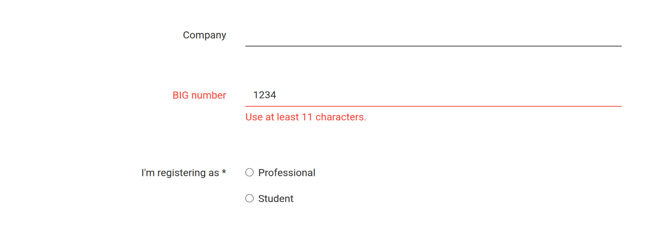
With validation rules you decide which answers a participant may enter in an open question (short), for example only digits, exactly 11 characters or a valid email address. If an answer doesn't meet a rule, the participant sees an error message and can only submit the form once the answer is correct.
Table of contents
Adding validation rules
You set validation rules on the open question (short) and on the Company question.
Step 1: In your event's dashboard, go to Event website > Registration form.
Step 2: Click the gear icon of the question and click Edit validation next to Validation. The Validation rules window opens.
Step 3: Click Add rule.
Step 4: In the Choose a rule list, choose the rule you want to use. If the rule needs a value, such as a number of characters, enter it in Value.
Step 5: (Optional) In Error message (optional), enter the text the participant sees when the answer doesn't meet this rule. If you leave it empty, the participant sees a standard message.
Step 6: Repeat steps 3 to 5 for every rule you want to add, and click Save.
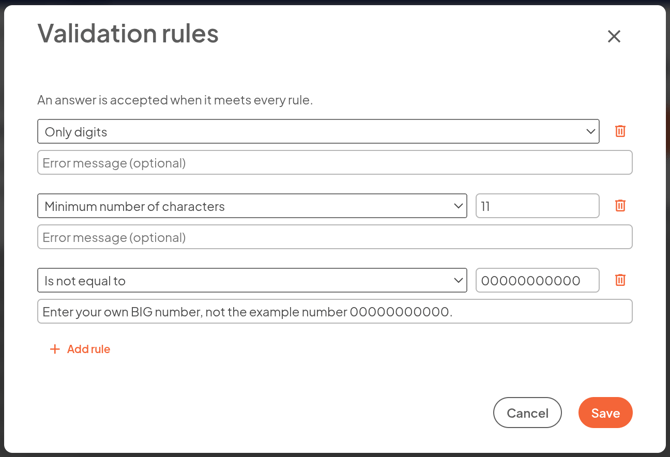
An answer is accepted when it meets every rule. The rules you set are then listed under Validation in the question's settings. Use the trash icon next to a rule to delete it.
Tip: The window helps you avoid mistakes. A rule shows a message when it doesn't have a usable value yet, for example Enter a whole number above 0. You also see it when two rules conflict, so that no answer can meet both, for example Only digits together with Is an e-mail address.
Note: If you change the type of a rule that already has a value or an error message, these are cleared. The window asks you to confirm this first.
Tip: Does your event have more than one language? Then you translate your own error message just like the text of the question itself.
The rules
- Is an e-mail address: the answer must be a valid email address.
- Minimum number of characters and Maximum number of characters: enter a whole number above 0 in Value. Spaces before and after the answer don't count.
- Only digits: the answer may only contain the digits 0 to 9, without spaces or other characters.
- Only letters: the answer may only contain letters. Spaces, hyphens and apostrophes are allowed too, so names like Jan-Willem and O'Brien work.
- Only uppercase letters and Only lowercase letters: like Only letters, but only uppercase or only lowercase letters.
- Is equal to: the answer must be exactly the value you enter, for example an access code. Upper and lower case don't matter.
- Is not equal to: the answer may not be the value you enter. This way you can, for example, rule out a fake answer like 00000000000. To rule out more than one value, add a separate rule for each value.
- Matches the regex pattern and Does not match the regex pattern: for advanced users. The whole answer must (or may not) match the pattern you enter. Read more below.
Note: For Is equal to and Is not equal to, the standard error message doesn't show the value, so an access code stays secret.
Regex pattern
With a regex pattern (regular expression) you describe exactly which form an answer must have, for example a Dutch postcode like 1234 AB.
- The pattern applies to the whole answer, not to part of it.
- Upper and lower case do matter. Put (?i) at the start of the pattern if they shouldn't.
- Some parts of regex are not supported, such as backreferences and lookarounds. If you use one of those, or the pattern is not correct, the rule shows This pattern cannot be used: with the reason. The pattern is then not saved.
Note: If you enter a value that can't be used in a rule that already worked, the rule keeps using the last working value. The rule then shows Until then, the rule keeps using: with that value.
What the participant notices
- If an answer doesn't meet a rule, the participant sees that rule's error message at the question. If the answer fails more than one rule, they see the message of the topmost rule in the list.
- Without a custom error message, the participant sees a standard message, such as Use digits only., Use at least 11 characters., This answer is not allowed. or This answer does not have the right format.
- Spaces before and after the answer are removed before the answer is checked and saved.
- If the question is not required and the participant leaves it empty, the rules are not checked. If they do enter something, the answer must meet the rules.
- If a participant changes their registration later, the rules are checked again.