
Preparation
First, contact our support team. They will enable the correct setting for your account and create the check-in configuration for the events where you want to use the Prospector app.
Set up the registration form
- Go to Event website > Registration form in your dashboard.
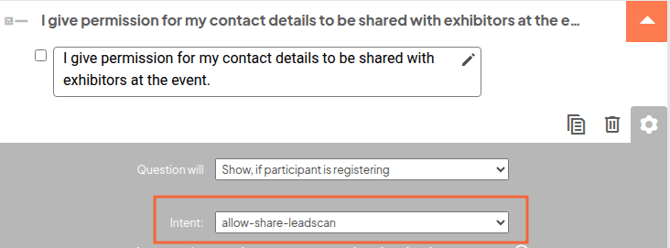
- Add a checkbox question to the registration form.
- Use this checkbox to ask participants for permission to share their information with exhibitors.
- Set the intent of this question to allow-share-leadscan.
- Make sure participants receive a QR code in the confirmation email or another mailing.
- (Recommended) add the QR code to the participant badge.
Add exhibitors
- Go to Manage registrations > Exhibitors in your dashboard.
- Choose how you want to add exhibitors:
- manually
- through an Excel file. (NOTE: First download the example file. Add the exhibitors to the file and upload it to your event. Keep columns A to C unchanged, even if you do not fill them in.)
- Click on Send instruction to all exhibitors.
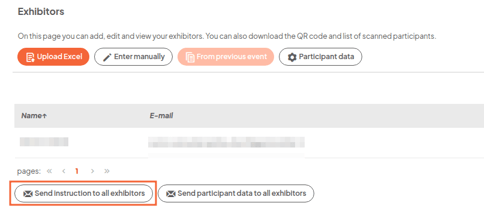
The exhibitors will then receive their personal QR code and instructions for using the Prospector app.
What does the exhibitor do?
The Exhibitor download the Prospector app: After that, the exhibitor scans the personal QR code from the instruction email. During the event, the exhibitor scans the QR codes of participants. These QR codes can be found on the participant’s badge or in their confirmation email.After the event
After the event, you can send the participant data to all exhibitors.
- Go to Manage registrations > Exhibitors.
- Click on participant data
- Select all the data you want to share with exhibitors.
- Click on Send participant data to all exhibitors.
Only data from participants who have given permission will be shared with exhibitors.