
Automatic replacements allow you to automatically personalise messages in aanmelder.nl with information such as a participant's name, registration details or links. The automatic replacements available depend on the type of message. If you use a code in a message type where it is not available, that part of the message will remain empty.
Automatic replacements that work almost everywhere
- {{recipient-salutation}} : the participant's name as registered or uploaded to the address book, based on the form of address set under Email settings in Recipient settings.
- {{recipient-name}} : the same as above, but without the form of address.
- {{event-name}} : the name of the event set under Website settings.
- {{organizer-name}} : replaced by the organiser's name as set under Email settings in Sender settings.
Adding answers from the registration form
Each question in the registration form has its own answer code. You can find this code in the settings for the relevant question in the registration form.
Answer codes don't work for answers to questions in surveys.
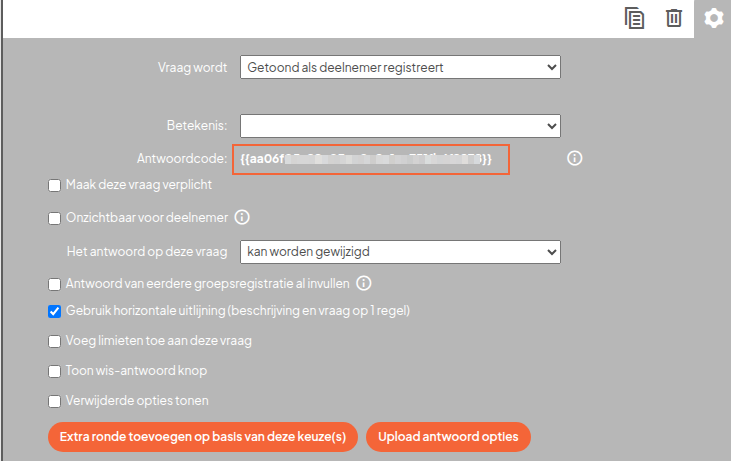
Add the answer code to the message. When the message is sent, it will be replaced by the participant's answer.
Please note: when you create a new registration form, new answer codes are created.
Registration confirmation message
- {{register-code}} : the participant's registration code
- {{register-link}} : link that allows the participant to view or edit their registration
- {{home-link}} : link to the personal event page
- {{author-account-link}} : link that allows an author to access their account
- {{event-platform-link}} : link to the online event platform. Only available for online events.
- {{email}} : the email address used to register the participant
Depending on your settings, aanmelder.nl can automatically add the following:
- QR code, when this has been set up
- Apple Wallet and Google Wallet buttons, when mobile tickets are enabled
- Buttons to add the event to a calendar, when calendar links are enabled
- A link to edit the registration, unless this has been disabled in the general settings of the event website
Tip: {{qr-code}} and {{mobile-tickets}} do not work in the registration confirmation message. Tickets are added automatically.
Confirmation after changing a registration
The same automatic replacements as in the registration confirmation message are available, plus:
- {{changes}} : overview of the changes made to the registration
Tip: {{changes}} only works in this type of message.
Deregistration confirmation
- {{register-code}} : the participant's registration code
- {{register-link}} : link to the registration
- {{home-link}} : link to the personal event page
- {{author-account-link}} : link that allows an author to access their account
QR codes, mobile tickets, calendar buttons and time slot overviews are not added.
Message to participants or contacts
- {{register-link}} : link to the registration
- {{home-link}} : link to the personal event page
- {{register-code}} : registration code
- {{event-platform-link}} : link to the online event platform. Only available for registered participants of an online event.
- {{certificate-link}} : link to download a certificate. Only available to organisations using certificates on request.
- {{qr-code}} : QR code for the registration
- {{mobile-tickets}} : buttons for mobile tickets
Tip: {{qr-code}} and {{mobile-tickets}} only work for recipients with a completed registration.
Abstract Handling
Confirmation after submitting a contribution
- {{contribution-name}} : title of the contribution
- {{contribution-id}} : reference number of the contribution
- {{author-account-link}} : link to the author's account
Confirmation after submitting a review
- {{contribution-id}} : reference number of the contribution
Message to an author about a decision
- {{contribution-name}} : title of the contribution
- {{contribution-link}} : link to the contribution
- {{contribution-edit-link}} : link to edit the contribution
- {{contribution-id}} : reference number of the contribution
- {{author-account-link}} : link to the author's account
- {{register-link}} : link to the registration
General message to all authors
- {{author-account-link}} : link to the author's account
Invitation or message to a reviewer
- {{reviewer-link}} : link that allows the reviewer to access the review
- {{register-link}} : link to the registration
SMS message
- {{register-code}} : registration code
- {{eticket}} : link to the QR code e-ticket
- {{regform}} : link to the registration or edit form
Payment reminder
- {{collection-fees}} : collection or reminder fees
- {{amount-owed}} : outstanding amount
- {{payment-link}} : link to pay the outstanding amount
Documents and badges
- {{current_date}} : current date
- {{current_time}} : current time
- {{last_registered}} : date and time of registration
- {{last_registered_date}} : date of registration
- {{last_registered_time}} : time of registration
- {{last_changed}} : date and time of the most recent change
- {{last_changed_date}} : date of the most recent change
- {{last_changed_time}} : time of the most recent change
For other information, use the available fields in the editor. These allow you to add the participant's name, organisation, country, answers from the registration form, event details, a QR code and images.